

If you're filing Form I-765 for Optional Practical Training in 2026, the filing fee is $470 online or $520 by paper. The form edition matters too: Which Form I-765 edition USCIS accepts depends on your postmark date: 08/21/25 before September 15, 2026, and 09/15/26 on or after it. Neither edition has a Social Security card request section. This guide walks through the filing process for all three OPT categories, including the myUSCIS online portal screen by screen, current processing-time guidance, and the separate STEM OPT 180-day automatic extension rule.
What Form I-765 does for F-1 students
Form I-765, Application for Employment Authorization, is the form that produces the Employment Authorization Document (Form I-766) you'll need to legally work in the United States during Optional Practical Training. For F-1 students, the I-765 sits at the center of three related but distinct work-authorization pathways, each tied to a specific eligibility category code on the form.
If you're a green-card applicant, a spouse of an E or L visa holder, or a TPS beneficiary, you'll also use Form I-765, but the process, fees, and documents are completely different. This guide covers only the F-1 student case. If you're a J-2 dependent looking at similar work authorization, see our field-by-field I-765 guide for J-2 applicants instead.
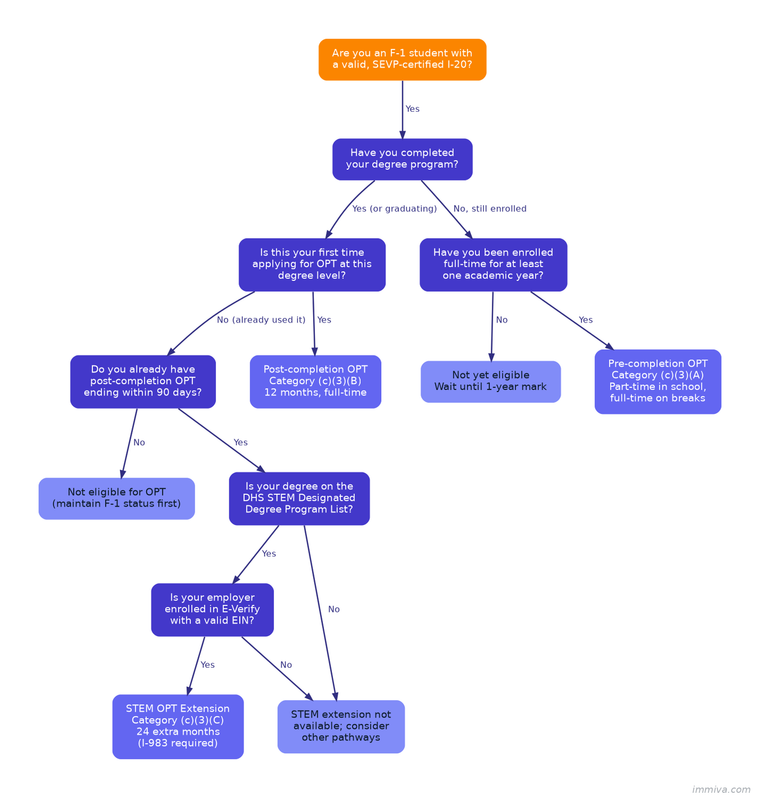
For F-1 students, three eligibility codes matter. Category (c)(3)(A) covers pre-completion OPT, used during a degree program. Category (c)(3)(B) covers post-completion OPT, the 12-month work authorization most international students use after graduation. Category (c)(3)(C) covers the STEM OPT extension, which adds 24 more months for students with qualifying STEM degrees. Picking the wrong code is one of the most common rejection reasons at the USCIS Lockbox, so we'll spend time on how to choose correctly.
The official form page, current instructions, and fee tables live on the USCIS Form I-765 page, and the regulatory framework sits in 8 CFR § 274a.12(c)(3) combined with 8 CFR § 214.2(f)(10).
Pre-completion vs. post-completion vs. STEM OPT: which category applies to you
Most F-1 students end up filing for post-completion OPT. The right category depends on where you are in your degree program and what work authorization you've already used.
Pre-completion OPT: Category (c)(3)(A)
Pre-completion OPT is for F-1 students who want to work before finishing their degree. You can apply up to 90 days before becoming eligible, which means 90 days before completing one full academic year as a full-time student at an SEVP-certified school. Work can't begin until that one-year mark passes. During the academic term you're limited to part-time hours (20 per week or fewer), and you can go full-time only during official school breaks.
There's a catch that makes pre-completion OPT a rare choice. Every day you work pre-completion is deducted from your post-completion OPT allowance. Full-time pre-completion OPT burns the 12-month clock at full speed; part-time burns it at half-speed. Most students skip pre-completion OPT entirely to preserve the full 12 months for post-graduation.
Post-completion OPT: Category (c)(3)(B)
Post-completion OPT is the default path. It gives F-1 graduates up to 12 months of work authorization at each higher educational level (bachelor's, master's, doctoral). The work must be directly related to your major field of study, and USCIS does not require a job offer to approve the application. After post-completion OPT begins, you may not accrue more than 90 days of unemployment during the 12-month period.
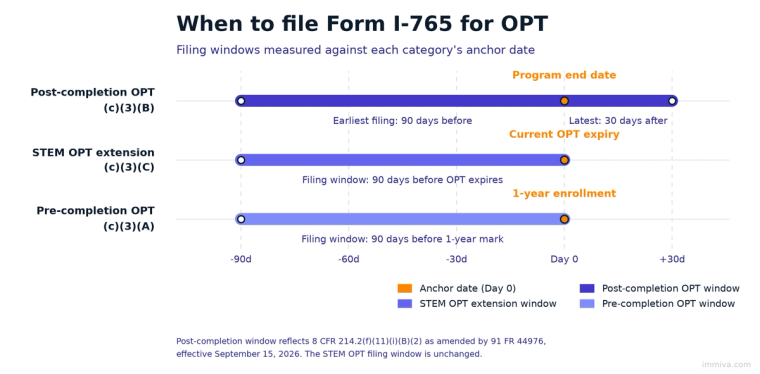
Filing timing is tighter than most guides explain. You can submit the I-765 no earlier than 90 days before your program end date and no later than 30 days after it. You also have to file within 30 days of the day your Designated School Official (DSO) enters the OPT recommendation into SEVIS and issues you a new I-20. Miss that 30-day window and USCIS will reject the application at the Lockbox regardless of where you sit in the four-month envelope.
STEM OPT extension: Category (c)(3)(C)
If your degree appears on the DHS STEM Designated Degree Program List, you may qualify for a 24-month extension on top of your initial post-completion OPT. Four other conditions apply. Your employer must be enrolled in E-Verify with a valid EIN and in good standing. You must file the I-765 up to 90 days before your current OPT expires. You must file within 60 days of your DSO's STEM OPT recommendation. And you must complete Form I-983, the Training Plan, which your DSO keeps on file (it never goes to USCIS).
STEM OPT adds one more important protection. If you file on time before your current EAD expires, you get an automatic 180-day extension of work authorization while the case is pending, under 8 CFR § 274a.12(b)(6)(iv). This 180-day STEM cap-gap is separate from the general automatic EAD extension rule that USCIS eliminated in October 2025. We'll come back to that distinction, because it's the single most misunderstood OPT policy point right now.
2026 fees, forms, and what USCIS actually requires
The filing fee math changed in April 2024 and has not moved for the OPT categories since, so many commercial sites still publish outdated numbers. For the full line-by-line breakdown, including the stale $410 figure you may still see quoted, read our complete 2026 OPT cost breakdown.
The current USCIS fee schedule sets the I-765 filing fee for all F-1 OPT categories at $470 when filed online through myUSCIS and $520 when filed on paper. The $50 difference is a paper-filing surcharge introduced by the January 31, 2024 USCIS Fee Final Rule (89 FR 6194) that took effect April 1, 2024. That same rule absorbed the old separate biometrics fee into the base fee for the (c)(3) categories, so there's no additional $85 biometrics line item anymore.
Premium processing is available for all three F-1 OPT categories. The current Form I-907 fee for eligible Form I-765 categories is $1,780. USCIS states a 30-business-day premium-processing time frame for eligible Form I-765 requests. You may file Form I-907 with the I-765 or request a premium-processing upgrade later, including online for eligible cases. With premium, the all-in online cost for OPT is $2,250.
Two other procedural rules matter for the fees.
As of October 28, 2025, USCIS generally no longer accepts personal checks, cashier's checks, or money orders for paper filings unless the filer qualifies for an exemption. Most paper filers must pay by credit or debit card (Form G-1450) or by ACH transfer (Form G-1650). Online filers pay electronically through the USCIS online system. We wrote a full breakdown in our guide on how to pay USCIS filing fees, and a shorter field note on the check policy change itself.
For the form edition, which version USCIS accepts turns on when you file: 08/21/25 if your application is postmarked or submitted online before September 15, 2026, and 09/15/26 on or after that date. There is no grace period in either direction. The online portal generates the right version automatically. Neither edition requests a Social Security card, so you can no longer get one through Form I-765. Apply for one with SSA once your EAD arrives.
When exactly can you file? The timing rules that trip up 1 in 4 applicants
Timing errors are the single most common reason USCIS rejects OPT applications at the Lockbox. Four separate windows can apply to your filing, depending on which category you're using.
The four-month window for post-completion OPT
For (c)(3)(B), USCIS accepts applications filed no earlier than 90 days before your program end date and no later than 30 days after it. Your program end date is the date printed on your I-20, which for most students is the final date of the degree program as certified by their DSO. "Within four months" isn't a helpful mental model. Treat it as two separate hard deadlines on opposite sides of your program end date.
That 30-day outer edge is new. It was 60 days until September 15, 2026, when the DHS final rule at 91 FR 44976 amended 8 CFR 214.2(f)(11)(i)(B)(2). The 90-day early edge did not move, so the window is now four months wide rather than five.
The same 30 days caps the start date you request. Under amended 8 CFR 214.2(f)(11)(i)(D), an F-1 student may not ask for an OPT start date more than 30 days after the program end date. Filing on time does not rescue an application that requests a later start, so the date you enter on the I-765 carries as much weight as the postmark.
The 30-day rule after DSO recommendation
Inside the four-month window, there's a stricter inner deadline. USCIS must receive your I-765 within 30 days of the date your DSO recommends you for OPT in SEVIS and issues your updated I-20 with the OPT recommendation. If the I-20 is more than 30 days old when your application reaches USCIS, the agency will reject it. Students who mail on day 28 and get receipted on day 32 because of postal delays get rejected under this rule every cycle.
Online filers usually have an easier time with the 30-day rule because USCIS receipts online applications almost instantly. Paper filers should factor in 3 to 5 days of mail delivery plus Lockbox intake time.
The 90-day window before STEM OPT expires
For the STEM extension (c)(3)(C), the earliest filing date is 90 days before your current post-completion OPT EAD expires. You also have to file within 60 days of your DSO's STEM OPT recommendation. Both windows have to be open at the same time, so in practice most STEM applicants file in the 60-day overlap in the final quarter of their initial OPT period.
The one-year enrollment rule for pre-completion OPT
For (c)(3)(A), the earliest filing date is 90 days before you hit the one-year full-time enrollment mark. But you cannot actually begin work until that one-year mark passes, regardless of how early USCIS approves the application.
Step-by-step myUSCIS online filing walkthrough
Online filing through myUSCIS has been available for all three F-1 OPT categories since April 2021, and it's now the recommended path at nearly every major university's international office. Online filings receipt faster, cost $50 less than paper, and let you upload documents directly instead of mailing originals. Here's what each screen looks like in the 2026 portal.
Step 1: Create your myUSCIS account
Go to my.uscis.gov and create an account with a personal email address you'll keep access to for the full OPT period. You'll need to set up two-factor authentication with either an authenticator app or a phone number. USCIS allows only one active account per applicant, and you can't share accounts with a spouse or parent. If your DSO helped you create an account during application prep, log back in with those credentials rather than starting over.
Step 2: Start Form I-765
From the dashboard, select "File a Form Online," then choose "I-765, Application for Employment Authorization." The system walks you through a series of questions that determine which version of the form you see, which is why selecting the right eligibility category at the start matters.
Step 3: Select your eligibility category
This is the first place most applications go wrong. The dropdown shows dozens of categories, and F-1 students need to pick exactly one of three:
(c)(3)(A) for pre-completion OPT, (c)(3)(B) for post-completion OPT, or (c)(3)(C) for the STEM OPT extension. Don't confuse (c)(3) with (c)(9), which is for applicants with a pending Form I-485 Adjustment of Status. That's an entirely different work authorization pathway.
Step 4: Premium processing decision
The portal will ask whether you want to file Form I-907 for premium processing. You can say no and add it later if your timeline changes. The $1,780 fee is paid separately from the I-765 base fee, and the 30-business-day clock starts when USCIS confirms receipt of the I-907.
Step 5: Reason for applying
Counterintuitively, the correct answer for all three OPT categories when you're filing an OPT application for the first time at a given degree level is "Initial permission to accept employment," even for STEM OPT, which feels like a renewal but is treated administratively as a new application. Select "Renewal" only if you're replacing a lost or damaged EAD card.
Step 6: Previous Form I-765 filings
If you've filed I-765 before (for instance, you used CPT, then initial OPT, and you're now filing for STEM), the portal will ask you to list prior applications and upload any previous EAD cards. Have your previous EAD handy; you'll need the card number and the validity dates.
Step 7: About You
Enter your legal name exactly as it appears in your passport. If your I-20 has your name in a different order than your passport (which is common for students from countries that use different naming conventions), prioritize the passport order. List every other name you've used, including maiden names and transliterations. For the mailing address, pick an address you'll reliably have access to for at least four months. This is where USCIS sends your EAD card, and USPS will not forward government mail.
Step 8: Other identifying information
You'll need your SEVIS ID (a nine-digit number starting with N, printed on your I-20), your country of birth and country of citizenship, and your most recent I-94 arrival/departure record. If you already have an A-number from prior USCIS interactions, enter it. Most first-time OPT applicants won't have one. Leave it blank rather than guessing.
Step 9: Social Security number
Neither the 08/21/25 nor the 09/15/26 edition has a Social Security card request. All that is left is one field for a Social Security number you already have. Enter it if you have one. If you do not, leave the field blank and move on. Nothing on this edition asks whether you want a card.
SSA's I-765-to-SSN process has been on hold since March 18, 2025, and the current edition dropped the request questions to match. Once your EAD arrives, apply for the card in person at a Social Security office with Form SS-5.
Step 10: Passport, travel, and entry information
Enter your passport number, issue and expiration dates, country of issuance, and your port and date of last entry to the United States. Use your I-94 record as the source of truth for the entry date, not your memory or your passport stamp; they sometimes diverge. You can pull a current I-94 from the CBP I-94 website if you don't have a copy handy.
Step 11: Upload evidence
This is where most applications stall. The portal accepts PDF, JPG, and JPEG files up to 6 MB each, and files cannot be password-protected or encrypted. Required uploads for all F-1 OPT categories: a signed OPT I-20 (both the student attestation and the DSO recommendation must show), the passport biographic page, your most recent I-94, and a 2x2 passport-style photo taken within the last 30 days. If you've had prior EADs, upload copies of both sides of each card.
STEM OPT applicants have additional uploads: the E-Verify Company Identification Number for their employer, evidence of the qualifying STEM degree (diploma or transcript), and a summary of the Form I-983 Training Plan. The full I-983 stays with your DSO and never goes to USCIS.
Photo specs are rigid. White or off-white background, no glasses, no head coverings except for religious reasons, no filters, no retouching. Walgreens, CVS, or USPS photo services all produce USCIS-compliant prints; taking a selfie and cropping it doesn't work.
Step 12: Review, sign, and pay
The portal generates a PDF preview of your completed form. Read every field, especially the name fields and the eligibility category. Sign electronically by typing your full legal name. Pay the fee through the Pay.gov integration. For OPT, that's $470 for online filings, or $2,250 if you're adding premium processing.
Occasionally the portal displays a duplicated charge of $1,020 for the base fee, which is a known bug rather than a real fee. Refresh the page and check the confirmation screen before you submit payment; the correct total is always $470 for I-765 alone.
Step 13: Confirmation and receipt
After payment, the portal displays a receipt number beginning with IOE, the prefix for cases adjudicated through the electronic processing pipeline. Paper filings get receipt numbers starting with YSC (the Potomac Service Center handles all paper F-1 OPT applications; no other service center adjudicates these categories). A physical receipt notice follows by mail within 1 to 2 weeks.
One subtle detail: while your application is in draft state in the portal, USCIS deletes it if you don't edit it for 30 consecutive days. If you're assembling documents over a long period, open the draft and save a minor edit every few weeks to preserve progress.
Your 2026 OPT document checklist
Here's what you should have ready before you start the filing process. Pre-completion and post-completion applicants need the same core set; STEM applicants add five more items.
Every F-1 OPT category: Signed OPT I-20 with the DSO's OPT recommendation in Section 5, passport biographic page, current I-94 from the CBP website, a 2x2 passport-style photo taken within the last 30 days, copies of any previous EAD cards (both sides), and the $470 online or $520 paper filing fee.
STEM OPT (c)(3)(C) adds: Your employer's E-Verify Company ID number, evidence of the qualifying STEM degree (diploma or final transcript), the Form I-983 Training Plan (retained by your DSO; you'll summarize it in the portal), and your previous EAD card from the initial post-completion OPT.
A common question from Reddit and Trackitt threads: do you need official transcripts for pre-completion or post-completion OPT? No. Only STEM OPT requires degree evidence, and for post-completion OPT the I-20 itself is treated as proof of degree completion status.
After you file: tracking, biometrics, RFEs, and travel
Tracking your case
You'll see case updates in the myUSCIS portal and can sign up for email or text notifications. Online filings show status changes within hours; paper-filed cases typically show a first update about 10 to 14 days after mailing. If you want a second check, our guide on five ways to check EAD application status covers the official and unofficial options.
Biometrics: the December 2025 change
USCIS may schedule biometric services appointments for Form I-765 applicants if required. If you receive a biometrics notice, attendance is mandatory unless properly rescheduled through your USCIS online account before the appointment date.
Processing times in 2026
As of April 2026, USCIS data and third-party trackers show online (c)(3)(B) post-completion OPT applications finishing in roughly 2 to 3 months, paper applications in 3 to 5 months. STEM OPT (c)(3)(C) tracks similar numbers. Premium processing guarantees 30 business days. The blended I-765 processing time across all categories sits at about 1.9 months as of this writing, down sharply from the 4 to 6 months seen in FY2022, though the broader USCIS backlog has climbed back over 11 million cases, as we covered in our 2025 USCIS backlog analysis.
Responding to an RFE
If you get a Request for Evidence, USCIS will specify a response deadline (usually 60 to 87 days) and a list of documents they need. Respond through the myUSCIS portal for online cases; paper cases respond by mail. Do not file a new application or ignore the RFE. Both terminate the case.
Traveling while OPT is pending
F-1 students can travel abroad while a post-completion OPT application is pending, but the risks go up once your program end date passes. The minimum documents to re-enter: valid passport, valid F-1 visa, I-20 with the OPT recommendation signed within the last 12 months, and either your EAD card (if issued) or the I-797 receipt notice with evidence of a job offer. Without a job offer, border officers have discretion to question or refuse admission. If your OPT is approved and your EAD is in hand, travel is far more routine.
Address changes during pendency
If you move while the I-765 is pending, file Form AR-11 online within 10 days and email your new address to PSC.studentead@uscis.dhs.gov with your receipt number. USPS will not forward EAD cards, so an outdated address can mean your card gets returned to USCIS and delayed for weeks.
The October 2025 rule change, cap-gap, and what STEM applicants actually need to know
This is the single biggest area of confusion in commercial OPT content right now.
The October 30, 2025 DHS interim final rule (90 FR 48799) ended the automatic extension of up to 540 days for EAD renewal applications filed on or after that date. That removal applies to renewal filings in categories like H-4 and asylum EADs; it never applied to OPT. F-1 STEM OPT applicants who timely file a STEM OPT extension still receive the separate 180-day automatic extension tied to STEM OPT, which the October 2025 rule did not touch.
The 540-day removal matters for H-4 EAD holders, for asylum EAD renewals, and for a long list of other renewal categories. It does not change anything for STEM OPT.
The STEM OPT 180-day extension for timely filed extensions comes from a separate regulation, 8 CFR § 274a.12(b)(6)(iv), which was written into the 2016 STEM OPT rule and was not touched by the October 2025 IFR. If you file your STEM OPT extension before your current OPT EAD expires, you remain authorized to work for up to 180 days while USCIS adjudicates the extension. Nothing about that changed in 2025.
Cap-gap is a different protection that applies when an F-1 student is selected in the H-1B lottery and their employer files Form I-129 requesting an October 1 start date before the OPT grace period expires. If USCIS receipts the H-1B petition in time, F-1 status and OPT work authorization extend automatically until April 1 of the relevant fiscal year (or the petition's validity start date, whichever is earlier) under 8 CFR 214.2(f)(5)(vii)(A). Our FY2026 H-1B cap recap covers the lottery mechanics, and the January 2025 H-1B changes guide explains the registration process that feeds cap-gap eligibility.
Unemployment, employment rules, and the 90/150-day clocks
Post-completion OPT allows up to 90 days of unemployment during the 12-month period. The STEM extension adds 60 more days for a total of 150 days of cumulative unemployment across both periods combined. If you exceed the limit, your DSO is required to report you to SEVIS, which can terminate your F-1 status.
Two details most applicants get wrong. First, the unemployment clock starts on your EAD start date, not the approval date. If USCIS approves your OPT in January but your start date is June 1, your 90-day clock begins June 1. Second, if you pick a later start date on your application, you give yourself more total unemployment runway, though USCIS has warned against abusing this and DSOs will push back on obviously gamed start dates.
What counts as employment for OPT purposes: paid employment for a single employer, paid employment with multiple employers concurrently, self-employment if you have your own business license and the work is directly related to your field, unpaid internships for post-completion OPT only if directly related to your major field of study, contract or 1099 work, and remote work from any U.S. state (you report the employer's primary address, not your home address).
What doesn't count, or comes with warnings: volunteer work for post-completion OPT counts as employment only if it would normally be paid in that role. Unpaid STEM OPT is not permitted. STEM regulations specifically require paid, structured training. Work for a foreign employer with no U.S. presence generally doesn't count as OPT employment and can trigger unemployment-day accrual.
Common rejections and how to avoid them
USCIS Lockbox rejections come from a narrow list of causes. Most are avoidable with a careful pre-filing checklist.
Wrong form edition. If you download an old PDF from a university website or third-party source, USCIS may reject it. The edition USCIS accepts turns on your postmark date: 08/21/25 before September 15, 2026, and 09/15/26 on or after it. Online filers get the current version automatically.
Wrong fee or failed payment. Paying $410 or $520 online, or $470 on paper, gets the application returned. Failed credit card authorizations also trigger rejection. Verify the exact amount before submitting.
Missing signature. Both the student attestation on the I-20 and the signature on the I-765 need to be completed. DSOs increasingly use electronic I-20 signatures, but the student signature on the I-20 must still be handwritten in ink or signed electronically through a compliant system.
Wrong eligibility category. Selecting (c)(9) instead of (c)(3), or (c)(3)(A) instead of (c)(3)(B), will either trigger a rejection or a slow-moving denial months after filing.
Outside the 30-day window. The most common and most preventable rejection. Confirm the date your DSO issued the OPT I-20 and count forward 30 calendar days. If you're close to the deadline and mailing paper, pay for overnight delivery or file online instead.
Bad photos. Filtered, retouched, older than 30 days, or non-compliant backgrounds all cause rejection. Get passport photos taken at a retail service that guarantees USCIS compliance.
No reason-for-applying selected. An easy field to skip on paper filings; online filings usually catch this before submission.
For RFEs on accepted applications, USCIS typically asks for one of: a signed I-20 that wasn't included, an updated photo if the original was poor quality, evidence of enrollment for pre-completion OPT, E-Verify documentation for STEM OPT, or clarification on prior EAD filings. Respond through the portal well before the deadline, include a cover letter, and re-upload any document referenced by the RFE even if it was in the original filing.
Where Immiva fits, and where it doesn’t
Most F-1 students don't need a $2,500 immigration attorney to file an OPT application. The rejection rate on DIY filings is real, though, and the consequences of losing a filing window matter. Immiva does not file OPT either. What we do prepare is the family and green card side, plus H-4 and J-2 work permits. You can see how Immiva works and check pricing before you start.