
If you're a J-2 visa holder applying for an Employment Authorization Document (EAD), you already know this: the Form I-765 is your only path to legal work authorization in the United States. But filling it out correctly as a category (c)(5) applicant has some specific requirements that generic instructions don't cover. And since October 2025, several major rule changes mean that outdated guides could actually hurt your application.
This guide walks you through every field on the I-765, written specifically for J-2 visa holders seeking work authorization. You'll learn the correct eligibility category, what to write in each box, what documents to include, and the common errors that trigger rejections and RFEs. If you're not sure whether you qualify for a J-2 EAD, check your eligibility first before starting.
Who Can File Form I-765 as a J-2 Dependent?
Before you start filling out the form, make sure you actually qualify. Under 8 CFR § 274a.12(c)(5), the following people can apply for a J-2 EAD:
You must be the spouse or minor child of a J-1 exchange visitor. Your J-1 principal must be maintaining valid status, and your own J-2 status must be current (8 CFR § 214.2(j)(1)(v)).
There's one rule that trips people up: your income from the EAD cannot be used to support the J-1 principal. The regulation is clear on this. Your earnings can go toward family expenses, recreational activities, and cultural activities, but the J-1's exchange program must be independently funded (8 CFR § 214.2(j)(1)(v)(A)).
If the J-1's DS-2019 program has ended or their status has lapsed, you cannot file. The J-1 must extend or renew their program before you submit your I-765.
For more on J-2 work rights, including what you can do once approved, see our J-2 visa work authorization guide.
Current Fees, Form Edition, and Filing Method
Here's what you need to know before you sit down to fill out the form:
Form edition: The current Form I-765 edition date listed by USCIS is 08/21/25. Download it directly from the USCIS I-765 page, and if you file by mail, make sure all pages are from the same edition and the edition date and page numbers are visible at the bottom of each page.
Filing fee: $520. J-2 EAD (category (c)(5)) is filed on paper and cannot be filed online, so the reduced online rate does not apply; the $520 fee applies to every J-2 filing. There is no separate biometrics fee for this category.
Payment method: As of October 28, 2025, USCIS only accepts electronic payment for paper filings. You must include either Form G-1450 (credit/debit card authorization) or Form G-1650 (ACH bank transfer). Personal checks, cashier's checks, and money orders will get your application immediately rejected. For more on how to pay USCIS filing fees, we have a separate guide.
Filing method: J-2 category (c)(5) applications must be filed on paper. You cannot file online. Print all 7 pages of the form single-sided.
Where to mail it:
For USPS:
Use the USPS address listed for your state on the USCIS Lockbox Filing Locations Chart for Certain Non-Family-Based Forms (Attn: NFB).
For FedEx/UPS/DHL:
Use the FedEx/UPS/DHL address listed for your state on the USCIS Lockbox Filing Locations Chart for Certain Non-Family-Based Forms (Attn: NFB).
Documents You'll Need Before Starting
Gather everything before filling out the form. Missing a single item can delay your case by months. Here's what you need, based on USCIS I-765 instructions:
- Completed Form I-765 (all 7 pages, signed in black ink)
- Your (J-2) Form I-94 (print from i94.cbp.dhs.gov)
- J-1 principal's Form I-94
- Both DS-2019 forms (most recent for both J-1 and J-2)
- Passport biographic pages (copies for both J-1 and J-2)
- Most recent visa stamps (copies for both J-1 and J-2; not required for Canadian citizens)
- Proof of relationship (marriage certificate for spouses, birth certificate for children; must include certified English translation if not in English)
- Support letter explaining why you want to work and confirming your income will not support the J-1 principal
- Two passport photos (2x2 inches, white background, taken within the last 30 days)
- Payment via Form G-1450 or G-1650
- Copy of previous EAD (front and back) if this is a renewal
- Form G-1145 (optional, for email/text notification when USCIS receives your package)
If you don't have an I-94 arrival/departure record, you'll need to print one before filing. And if you're not sure what your Alien Registration Number (A-Number) is, or whether you have one, check our explainer.
Field-by-Field I-765 Instructions for J-2 Category (c)(5)
This is the section you came here for. We'll go through every part of the form with instructions specific to J-2 applicants. If a field doesn't apply to you, we'll tell you exactly what to write.
Part 1: Reason for Applying
This is straightforward, but pick only one box:
| Item | When to Check It |
|---|---|
| 1.a. Initial permission | This is your first time applying for a J-2 EAD |
| 1.b. Replacement | Your current EAD was lost, stolen, or damaged, or it has an error USCIS did not cause |
| 1.c. Renewal | You had a previous J-2 EAD and it's expiring or expired. See our J-2 EAD renewal guide for renewal-specific tips. |
Part 2: Information About You (Pages 1-3)
This is where most mistakes happen. Pay close attention to every field.
Items 1.a. through 1.c. (Full Legal Name)
Enter your name exactly as it appears on your passport biographic page. Write your family name in all capitals (e.g., "SMITH"). If you don't have a middle name, leave 1.b. blank.
Items 2.a. through 4.c. (Other Names Used)
Include maiden names, nicknames, or any name you've used on official documents. If none, write "None."
Items 5.a. through 5.f. (U.S. Mailing Address)
Use an address that will be valid for 5-6 months. USCIS will not forward mail. If you're staying with someone temporarily, put "c/o [Their Name]" in Item 5.a. Include the full 9-digit ZIP code.
Item 6 (Is Your Physical Address the Same?)
Check "Yes" if your mailing address is where you live. Check "No" if you're using someone else's address for mail.
Items 7.a. through 7.e. (Physical Address)
Only fill this out if you checked "No" in Item 6.
Item 8 (Alien Registration Number)
If this is your first application and you've never had an A-Number, write "None." If you're renewing and received an A-Number with your previous EAD, enter it here. Your A-Number (if you have one) appears on the front of your EAD card.
Item 9 (USCIS Online Account Number)
Write "None."
Item 10 (Sex)
Select Male or Female. Older editions labelled this field "Gender."
Item 11 (Marital Status)
Select your current marital status.
Item 12 (Have You Previously Applied for an EAD?)
Check "Yes" if you've ever filed any Form I-765 before, even if it was denied. Check "No" if this is your very first I-765.
Item 13 (Social Security Number)
Enter your SSN if you have one. If you've never had a U.S. Social Security Number, leave this blank.
What the current edition no longer asks (SSN request and parents' names)
Items 14.a. through 14.b. (Country of Citizenship)
Enter your country of citizenship. If you hold only one citizenship, write "None" in 14.b.
Items 15.a. through 16 (Place and Date of Birth)
Enter your city of birth, country, and date of birth.
Item 17 (I-94 Arrival-Departure Record Number)
Enter the 11-digit number from your most recent I-94. You can retrieve this at i94.cbp.dhs.gov.
Item 18 (Passport Number)
From your passport biographic page.
Item 19 (Travel Document Number)
Write "None."
Items 20 and 21 (Passport Country and Expiration)
Enter the country that issued your passport and the expiration date.
Item 22 (Date of Last Arrival into the U.S.)
This must be your most recent entry date. If you've traveled internationally and re-entered the U.S., use the latest re-entry date, not your original arrival. If you're unsure, check your I-94 record.
Item 23 (Place of Last Arrival)
Enter the three-letter airport or port code (e.g., JFK, LAX, ORD, SFO).
Item 24 (Immigration Status at Last Arrival)
Write "J-2".
Item 25 (Current Immigration Status)
Write "J-2".
Item 26 (SEVIS Number)
Find this in the upper right corner of your DS-2019 form. It starts with "N00" followed by additional digits.
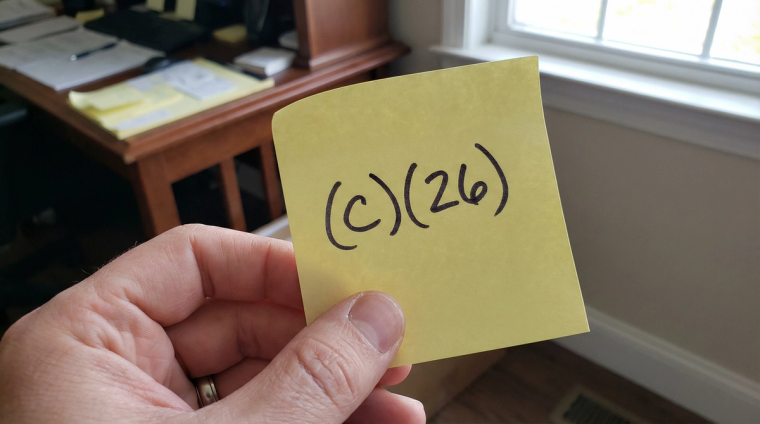
Item 27 (Eligibility Category)
Items 28.a. through 31.b. (Other Eligibility Categories)
None of these apply to category (c)(5). Write "N/A" in the text fields (28.a. through 29. and 31.a.) and leave the Yes/No boxes at 30. and 31.b. unchecked.
Parts 3-6: Signatures and Additional Information
Part 3 (Applicant's Statement and Signature)
Check Item 1.a. if you filled out the form yourself. Complete your contact information. Sign with black ink. A handwritten signature is required. The signature must be within the designated box.
Part 4 (Interpreter's Contact Information)
If no interpreter helped you, write "N/A" in all fields.
Part 5 (Contact Information for Preparer)
If you prepared the form yourself (no attorney or preparer), draw a diagonal line across this section and write "N/A."
Part 6 (Additional Information)
Use this space only if you need more room for any answers from previous sections. If you don't need it, leave it blank.
Common Mistakes That Get Applications Rejected
Based on the most frequent errors reported by USCIS and immigration offices, here are the top reasons J-2 EAD applications get rejected or receive RFEs. If you want to avoid dealing with a Request for Evidence, get these right the first time:
Immediate rejection (application returned unopened):
- Using an outdated form edition
- Paying with a personal check or money order (no longer accepted since October 2025)
- Wrong filing fee amount (must be exactly $520)
- Missing pages (you need all 7, single-sided)
- Missing signature or signing outside the box
- Missing passport photos
RFE triggers (USCIS asks for more information, delaying your case):
- Wrong eligibility category (using (c)(9) or leaving Item 27 blank instead of (c)(5))
- Missing J-1 principal's documents (DS-2019, I-94, passport copy)
- No proof of relationship (marriage or birth certificate)
- Entry date that doesn't match the most recent I-94
- Missing or inadequate support letter
- Insufficient proof that J-1 is maintaining status
Processing Times and What Happens Next
After USCIS receives your application, here's the general timeline:
Receipt notice (Form I-797C): Typically arrives 2-4 weeks after USCIS receives your package. This confirms they have your application and includes your receipt number for tracking your case status.
Biometrics appointment: You may receive a notice to appear at an Application Support Center for fingerprinting. This usually happens 3-6 weeks after the receipt notice. Here's what to expect at a biometrics appointment.
Decision: Current J-2 EAD processing times average 3 to 5 months, though this varies by service center. Premium processing is not available for J-2 EAD applications. If you need your EAD faster, see whether an expedite request might work for your situation.
EAD card delivery: USCIS states your EAD card should be produced within 2 weeks after approval, and you should allow up to 30 days from approval before inquiring about non-delivery (delivery time can vary).
After Your EAD Is Approved
Once you have your EAD card in hand:
Getting a Social Security Number: Since the SSN-through-EAD program is currently paused, you'll need to visit a Social Security Administration office in person. Bring your EAD, passport, I-94, and DS-2019. Processing typically takes 2-4 weeks after your visit. We cover this in detail in our J-2 EAD and Social Security Number guide.
Employment restrictions: Unlike some other EAD categories, the J-2 EAD has no restrictions on employer type, industry, or hours. You can work full-time, part-time, for multiple employers, or even start your own business. You can also freelance or work remotely. The only restriction is that your income cannot be the primary support for the J-1 principal.
Planning your renewal: Keep track of your EAD expiration date. With the elimination of automatic extensions, early renewal filing is more important than ever. Read our J-2 EAD renewal guide well before your card expires.