
The quick answer
For most applicants, filing N-400 online is the better option. It's cheaper ($710 vs $760), you get your receipt notice instantly, and your green card extension proof is available right away. But you must file on paper if you need a fee waiver, qualify for the reduced fee, or are filing from outside the United States.
Not sure if you're eligible to apply in the first place? Use our free N-400 eligibility checker before deciding on a filing method.
Here's a simple way to decide:
- Need a fee waiver or reduced fee? You must file on paper.
- Filing from abroad? You must file on paper.
- Everyone else? Online filing saves you money and gives you faster access to your case.
For a full walkthrough of the entire citizenship process, see our step-by-step N-400 guide.
Online vs paper: Side-by-side comparison
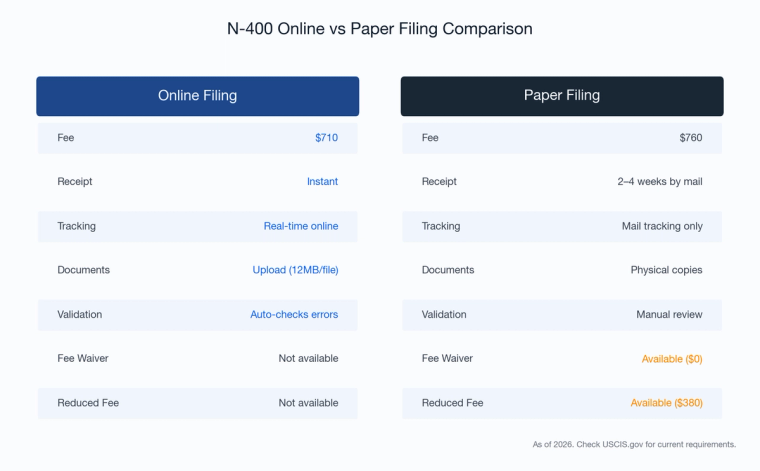
Every important difference between online and paper N-400 filing, in one place:
| Feature | Online Filing | Paper Filing |
|---|---|---|
| Filing fee | $710 | $760 |
| Reduced fee ($380) | Not available | Available (150-400% FPG) |
| Fee waiver ($0) | Not available | Available (Form I-912) |
| Payment method | Pay.gov (card or bank account) | Form G-1450 (card) or G-1650 (ACH) |
| Checks/money orders | N/A | No longer accepted (since Oct 2025) |
| Receipt notice | Immediate (1-3 days) | Several weeks |
| Green card extension proof | Available immediately | Delayed until receipt arrives |
| USCIS account | Required before filing | Created after receipt |
| Form adapts to your answers | Yes (conditional logic) | No (complete all sections) |
| Error alerts before submission | Yes | No |
| Save and return to draft | Yes (30-day inactivity limit) | N/A |
| Document submission | Upload (12MB max, PDF/JPG) | Mail physical copies |
| Case tracking | Real-time from day one | Available after account created |
| Secure messaging with USCIS | Yes, immediately | Not until account linked |
| Form version risk | Auto-updated | Risk of using outdated edition |
| Filing from abroad | Not available | Required |
| Processing time after receipt | Same queue | Same queue |
| Biometrics required | Yes (always) | Yes (always) |
(USCIS Fee Schedule, Form G-1055; USCIS Online Filing page)
What online filing actually costs (and saves)
Since April 1, 2024, online N-400 filers pay $710, while paper filers pay $760. Both amounts include biometrics costs, which were previously listed separately under the prior fee structure.
The catch: fee waivers (Form I-912) and reduced fees ($380 for households earning 150-400% of the Federal Poverty Guidelines) are only available through paper filing. If you qualify for either of these, paper is your only option, and it could save you far more than $50. For a full breakdown of all N-400 costs and ways to save, read our guide to N-400 filing fees and alternatives.
Does online filing speed up processing?
This is the most common misconception. Online filing does not get you through the process faster overall. Once USCIS accepts your application, both online and paper filings enter the exact same adjudication queue. USCIS does not publish separate processing times for different filing methods (USCIS Processing Times).
The only real speed advantage is at the very beginning. Online filing can eliminate mailing time and can reduce lockbox intake delays compared with paper filing, so applicants often receive their receipt notice sooner when they file online. USCIS does not publish guaranteed receipt-notice timeframes for online vs. paper filings.
That timing matters if your green card is close to expiring. Effective Dec. 12, 2022, after you properly file Form N-400, USCIS issues a receipt notice that automatically extends the validity of your Green Card for 2 years from the "Card Expires" date on your Green Card. You generally need that receipt notice (presented together with your Green Card) as proof of the extension.
After that initial step, the timeline is the same. Processing times vary widely by field office, and USCIS posts current estimates on its Processing Times page.
How online filing works
There are two ways to file N-400 online through your USCIS account:
Option 1: The guided workflow. USCIS walks you through the form question by question. The form adapts based on your answers, so you only see sections that apply to you. It flags errors before you submit. This is the most common approach for self-filers.
Option 2: Upload a completed PDF. You can fill out the N-400 PDF separately and then upload it through the online system. You still get all the benefits of online filing: the $50 discount, instant receipt notice, real-time case tracking, and secure messaging with USCIS. This is how services like Immiva's guided N-400 preparation work. You prepare your application with step-by-step guidance on Immiva, then upload the completed PDF to USCIS to file online.
Online filing has a few technical requirements to keep in mind. Documents must be under 12MB per file in PDF, JPG, or JPEG format. Foreign-language documents need a certified English translation uploaded alongside the original. And if you start a draft online, you have 30 days of inactivity before USCIS deletes it automatically.
For a complete list of everything you need to gather before filing, see our N-400 document checklist.
How paper filing works
Paper filing means mailing your completed N-400 to the correct USCIS lockbox. The mailing address depends on where you live and whether you're using USPS or a courier service. You can find the correct address on the official N-400 instructions page.
You'll include your payment form (G-1450 for card or G-1650 for ACH) and supporting documents. Two passport-style photos are generally only required in limited situations (for example, for certain applicants who reside outside the United States). USCIS will mail back a receipt notice (Form I-797C).
After USCIS processes your paper filing, they'll send you instructions to create an online account and link your case. From that point forward, you can track your case status and communicate with USCIS online, just like someone who filed electronically.
Common reasons paper filings get rejected include using an outdated form edition, missing signatures, incorrect payment, or sending to the wrong address. Online filing eliminates most of these risks because the system validates your submission before you send it. If you're filing N-400 without a lawyer, the built-in error checking alone is a strong reason to file online.
When you must file on paper
Two situations require paper filing. There's no workaround:
Fee waiver or reduced-fee applicants. If your household income qualifies for a Form I-912 fee waiver or the reduced $380 filing fee, you have to file by paper. Those options aren't available through the online portal. See our N-400 fee waiver guide for current income limits and how to qualify.
Applicants filing from abroad. If you're filing from outside the United States (which only applies in limited circumstances), you must file by mail.
For everyone else, online filing is available and offers more advantages.
What both methods have in common
Regardless of how you file, the rest of the process is identical. Both online and paper filers go through the same steps: biometrics appointment, citizenship interview, English and civics tests, and oath ceremony.
Both methods require a biometric services appointment unless USCIS waives the requirement. Under USCIS guidance effective Dec. 12, 2025, Form N-400 is among the forms that always require new biometrics, including a fresh photograph.
Processing times are the same once your application enters the system. And the citizenship requirements are identical: generally 5 years of permanent residence (or 3 years if married to a U.S. citizen), continuous residence, physical presence, and good moral character (INA § 316(a)).
Prepare for the civics portion of your interview with our 128-question civics study guide, and check our complete interview checklist so you know what to bring on the big day.
Common mistakes to avoid
If you file online, watch out for these pitfalls:
- Letting your draft expire. USCIS provides technical tips for online filing (including file-size limits and accepted file formats). If you start an online N-400 draft, log in regularly and review your account to make sure your draft is still available before you're ready to submit.
- Uploading oversized documents. Keep each file under 12MB. If a document exceeds this, reduce the resolution or split it into multiple files.
- Assuming online means faster processing. It doesn't. You skip about a week of mail time at the start, but the adjudication timeline is the same.
If you file on paper, avoid these:
- Using an outdated form edition. USCIS rejects applications filed on old editions. Online filing handles this automatically.
- Sending to the wrong lockbox. The mailing address varies by state. Double-check the USCIS N-400 filing addresses before mailing.
- Trying to pay with a check. USCIS stopped accepting checks and money orders in October 2025.
For more on the most frequent application errors, see our guide on N-400 mistakes that get applications denied.