
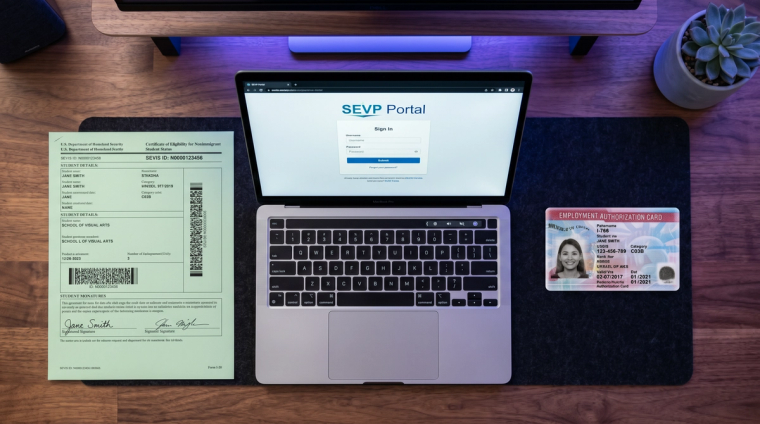
If you were just approved for OPT or STEM OPT, the SEVP Portal is probably the next thing on your list. It's how ICE tracks where you live, where you work, and whether you're employed. The legal scaffolding is 8 CFR 214.2(f)(12). Skip a 10-day deadline or go past the 90-day unemployment cap and SEVIS termination becomes a live possibility.
Most of the writeups out there are tied to one university's intranet. This one isn't. It covers what F-1 students on OPT actually have to do, updated for 2026.
What the SEVP Portal is and who uses it
The SEVP Portal is a self-service tool from ICE's Student and Exchange Visitor Program. It lets you update your own SEVIS record. Two groups get accounts: F-1 students on post-completion OPT (including the STEM OPT extension), and M-1 students on practical training. Pre-completion OPT and current coursework students don't have access.
Your university may have its own reporting system on top of the portal. Both can matter. The school system keeps your DSO in the loop. The SEVP Portal pushes data into SEVIS. SEVP says students can use the SEVP Portal to report changes or ask a DSO to report them, but you should follow your school’s instructions because STEM OPT items such as Form I-983 updates and some employer changes must go through your DSO.
How and when you get your portal account
The portal emails you an activation link once your OPT is approved, your EAD start date has passed, and SEVIS has a working email on file for you. The sender is do-not-reply.SEVP@ice.dhs.gov and the subject line is "Optional Practical Training Approval: the next step." Check spam. The link is single-use and expires after 14 days.
Some rules that catch people off guard:
- The portal locks after 3 failed login attempts or 90 days of inactivity. Ask your DSO to reset.
- You can't change your portal email yourself. Only your DSO can update it in SEVIS.
- The SEVP Response Center is 703-603-3400, Monday to Friday, 8 a.m. to 6 p.m. Eastern.
Use a desktop browser. Mobile sessions tend to die quietly halfway through a form.
The 10-day reporting rule: what to update
Under 8 CFR 214.2(f)(12), you have 10 days from any of the following changes to update your record:
- Legal name (through your DSO, not the portal)
- Residential address, mailing address, or phone number
- Employer name or address
- Employment start or end date
- A change in your employer-employee relationship
The clock starts the day the change happens, not the day SEVIS reflects it. New job on Monday? Day one of your 10-day window is that Monday, even if your offer letter is from three weeks earlier.
On regular post-completion OPT you can edit your employer information yourself. On STEM OPT you can still update profile fields like address or phone, but only your DSO can add a new employer because every STEM OPT job needs an I-983 Training Plan on file before you start.
OPT vs STEM OPT reporting: the differences that matter
The two programs share the 10-day rule, but everything else about the reporting workflow is different.
The short version: STEM OPT is the stricter program, and the portal does less for you. Unpaid work, volunteering as a substitute for employment, and self-employment are all out. Every employer has to be in E-Verify and in good standing. You'll do validation check-ins at 6, 12, 18, and 24 months. Material changes to your I-983 (a corporate restructuring that changes your employer's EIN, or a real drop in your weekly hours) need a modified I-983 sent to your DSO as soon as possible.
How to add or update an employer in the portal
Log in at https://sevp.ice.gov/opt and accept the acknowledgment. You'll land on a dashboard. To add a job, go to Manage Employment and pick Add Employer.
What each field actually wants:
- Employer name: the legal entity name from your offer letter, not a parent or DBA
- EIN: the employer's federal tax ID (ask HR or check a pay stub)
- Address: the actual worksite; for hybrid or remote roles, use the address from your offer letter
- Supervisor: name and phone of the person directly overseeing your work
- Hours per week: for post-completion OPT, qualifying employment must be at least 20 hours per week; for STEM OPT, each employer must provide at least 20 hours of training per week.
- Start date: your actual first day of work
- Job title and duties: specific enough to show the role relates to your degree
- Relation to your major: tie the work back to your field of study; vague answers attract scrutiny at future H-1B or AOS stages
Self-employment is allowed on regular OPT (not STEM OPT). If that's you, check the self-employment box and keep documentation handy: a business license, registration paperwork, and proof your work uses your degree. Got multiple employers? Add them one at a time.
Tracking unemployment days: the 90 and 150-day caps
8 CFR 214.2(f)(10)(ii)(E) sets the limit: 90 cumulative days of unemployment on your 12-month post-completion OPT, and 150 cumulative days total if you continue onto STEM OPT (the first 90 carry over; you get an extra 60). The portal does not track this for you, so our OPT unemployment guide walks through how the counter works, what counts as employment, and how to stay under the limit.
SEVP policy and SEVIS guidance continue to treat failure to report while on OPT as a status-risk issue, and SEVIS includes termination reasons tied to failure to report during OPT. Keep employer information current and work with your DSO promptly if your record is missing employment information.
What the portal can't do (and your DSO has to handle)
These look like portal tasks, but they aren't:
- Form I-983 Training Plan and any material changes
- Adding a new STEM OPT employer
- Legal name changes and date-of-birth corrections
- Changes to the email address tied to your portal
- Late employment reports (anything more than 10 days back-dated)
- STEM validation reports and 12 or 24-month self-evaluations
- I-20 reprints and SEVIS transfers
Quick test: if it involves a form, an evaluation, or backdating something, it's a DSO task.
Troubleshooting the most common issues
Activation email never arrived. Confirm your OPT has been approved, your OPT start date is not in the future, and your email address is in SEVIS. Check spam. Then ask your DSO to verify your email address in SEVIS and request that the initial account-creation email be resent or reset your portal account if needed.
Account locked. Three wrong passwords or 90 days of inactivity will lock it. Try the password reset link first. If that doesn't work, your DSO can do a full account reset.
Start date is more than 10 days in the past. The portal won't accept it. Email your DSO documentation of the actual start date so they can enter it on the SEVIS side.
Address rejected. The portal checks addresses against USPS records and chokes on ampersands, slashes, and odd punctuation. Run your address through the USPS lookup tool first.
What changed in 2025-2026 that OPT students should know
Three things changed recently that you should know about.
The October 30, 2025 DHS interim final rule removing the automatic EAD extension under 8 CFR 274a.13(d) for renewal applications filed on or after October 30, 2025 does not remove the separate STEM OPT 180-day automatic extension. STEM OPT's 180-day automatic extension under 8 CFR 274a.12(b)(6)(iv) still works if you properly and timely file your STEM OPT Form I-765 before your post-completion OPT EAD expires. The change affected categories that previously relied on the 8 CFR 274a.13(d) automatic extension, including H-4 EAD renewals filed on or after October 30, 2025, which we cover in our H-4 EAD auto-extension guide.
USCIS may require Form I-765 filers to appear for biometrics, including a photograph, signature, and/or fingerprints, at an Application Support Center if biometrics are needed. If you receive a biometrics appointment notice, our biometrics appointment guide walks through what to expect.
And the wider processing slowdown we covered in our USCIS backlog analysis is hitting I-765 filings too, so plan for delays.