
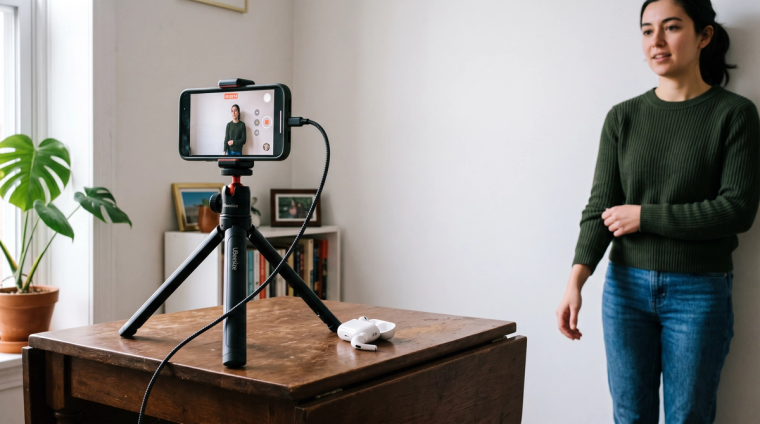
Most photo guides start with a ruler and end with a link to buy something. Start somewhere more useful: do you even need to mail photos?
For a lot of people reading this in 2026, the answer is no. A December 2025 policy change moved photo collection out of your envelope and into the Application Support Center. It did not change every form, and it did not change the specs. If you are filing from abroad, petitioning for a spouse, or you just want the photo right when USCIS takes it, the measurements still matter.
What changed on December 12, 2025
USCIS issued Policy Alert PA-2025-29, "Photograph Reuse for Identity Documents," on December 12, 2025. Two things came out of it.
First, it narrowed reuse. USCIS may only reuse a photo on file if no more than 36 months have passed since it was collected at a biometric services appointment (USCIS Policy Manual, Vol. 1, Part C, Ch. 2). Four forms always need a new one regardless: N-400, N-600, I-90, and I-485.
Second, USCIS announced it would stop accepting self-submitted photos and use only photos taken by USCIS or another authorized entity (USCIS newsroom alert). The photo on your card now comes from the biometrics appointment, not the envelope you mailed.
Important: You still cannot ignore your form instructions. The Policy Manual says USCIS may require a photograph in limited circumstances, subject to those instructions. Where they ask for two photos, include two. The ASC photo is what USCIS uses; the mailed photos are what your instructions require.
Which forms still need photos in the envelope
This is where most articles go wrong, copying old numbers instead of reading current instructions. Here is what each says as of August 30, 2026.
| Form | Photos to mail | Source |
|---|---|---|
| I-485 (green card) | Two identical, taken recently | Instructions ed. 01/20/25 |
| I-765 (EAD, including H-4 and J-2) | Two identical, taken recently | Instructions ed. 08/21/25 |
| I-130 (spouse petitions) | Two of the petitioner and two of the spouse beneficiary if in the U.S., within 30 days of filing | Instructions ed. 04/01/24 |
| N-400 (naturalization) | None, unless you are in a category applying from outside the U.S. | Instructions ed. 01/20/25 |
| I-539 (change of status, including H-4) | None listed | Instructions ed. 08/28/24 |
| I-751 (remove conditions) | None, unless filing from abroad on military orders, then two per petitioner and dependent | uscis.gov/i-751 |
Two corrections. The I-485 and I-765 instructions say "taken recently," not within 30 days; only the I-130 instructions set a 30-day window. And the photos people mean for the I-751 are wedding and holiday pictures used as evidence of a real marriage, not 2x2 photos.
Form editions move too, and several change on September 15, 2026, so check the edition date at the bottom of your instructions first. Immiva builds a personalized document checklist from your answers, which is exactly what people get wrong when they work from a year-old printout.
The exact 2x2 specs
These come from the Form I-485 instructions, and the same paragraph appears word for word in the I-765 and N-400 instructions.
- Two identical color photos, 2 by 2 inches, full face, frontal view
- White to off-white background
- Printed on thin paper with a glossy finish, unmounted and unretouched
- Head height 1 to 1 3/8 inches, measured from the top of your hair to the bottom of your chin
- Eye height 1 1/8 to 1 3/8 inches from the bottom of the photo
- Head bare, unless you wear headwear required by your religious denomination
Composition rules come from the U.S. Department of State, whose standard USCIS follows: taken within the last six months, current appearance, neutral expression, both eyes open, everyday clothing. Uniforms are out except daily religious clothing, and headphones and wireless earpieces are not acceptable (Department of State photo requirements).
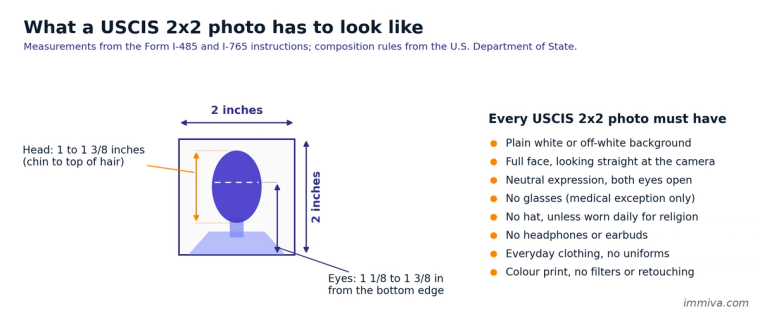
The measurements and composition rules a USCIS 2x2 photo has to meet.
What gets a photo rejected
The State Department is direct about what it will not take: photos copied or scanned from a driver's license or other official document, snapshots, magazine photos, low quality vending machine or mobile phone photos, and full-length shots.
Beyond that, these catch people out:
- Editing. No digital enhancement or alteration that changes your appearance. That covers beauty filters, skin smoothing, and background replacement.
- Shadows. A shadow behind your head means you stood too close to the wall. Step forward and light your face from the front.
- Head size. Too far from the camera and your head lands under the 1 inch minimum. This is the most common measurement failure.
- Glasses. Not allowed, with a narrow medical exception covered below.
- Appearance changes. Even inside the six month window, you need a new photo after significant facial surgery or trauma, large new piercings or tattoos, or significant weight change. A beard or new hair color does not count.
A photo problem is not what gets a packet bounced at intake. Lockbox rejections come from the wrong form edition, a missing signature, or the wrong fee, and Immiva flags those before you file. A photo issue is likelier to become a request for evidence. What sinks a case is skipping biometrics, which USCIS treats as abandonment and denies (8 CFR 103.2(b)(13)(ii)). If you cannot make the date, reschedule before the appointment time.
Glasses, head coverings, babies, and hearing aids
Glasses. Take off eyeglasses, sunglasses, and tinted glasses, and do not rest them on your head. The only exception is when they cannot be removed for medical reasons, which requires a signed statement from a medical professional. Even then the frames must not cover your eyes, with no glare or shadow.
Head coverings. Nothing that obscures your hair or hairline, unless worn daily for religious purposes, with your full face visible and unshadowed.
Hearing devices. If you normally wear one, you may wear it.
Babies and toddlers. No other person in the frame, and your child should be looking at the camera with eyes open. The State Department suggests laying the baby on a plain white sheet, or covering a car seat with one, so the head stays supported against a clean background.
How to take your USCIS photo at home for free
You are allowed to do this yourself. The State Department recommends a professional service but permits taking your own, as long as the photo is not digitally altered.
- Stand about two feet in front of a plain white or off-white wall, so your shadow falls behind you.
- Light your face from the front. A large window beats an overhead bulb, which drops shadows into your eyes.
- Have someone hold the phone at your eye level, about four feet away, using the rear camera. Selfie cameras distort facial proportions at close range.
- Neutral expression, mouth closed, both eyes open, looking straight at the lens.
- Crop to a square with the free State Department photo tool. It crops only, and a State Department employee makes the final call on acceptability.
- Print it. Tiling several 2x2 copies onto one 4x6 at a pharmacy kiosk costs a fraction of the photo counter price.
Skip any service promising guaranteed acceptance. No third-party tool decides it.
Labeling and mailing
If your form does require photos, use a pencil or felt pen to lightly print your full name and A-Number on the back of each, without pressing hard enough to show through the front. Put them in a small envelope or sleeve clipped to your packet rather than stapling them.