

While you wait for permission to work, you may be trying to plan around a job offer, rent payments, and the expiration date on your card. Start by identifying your category using the I-765 work permit overview. Then use our guide to checking your EAD application status to follow your own application’s progress alongside the overall processing estimate.
Data note, October 24, 2026: The figures below are USCIS historical national medians for fiscal year 2026 through August 30, 2026. They describe completed cases, not a promised decision date. We verified the indexed official historical table. The live office-specific tool was unavailable during this update, so we have not presented older office estimates as current. (USCIS historical processing times)
Work permit processing time by I-765 category
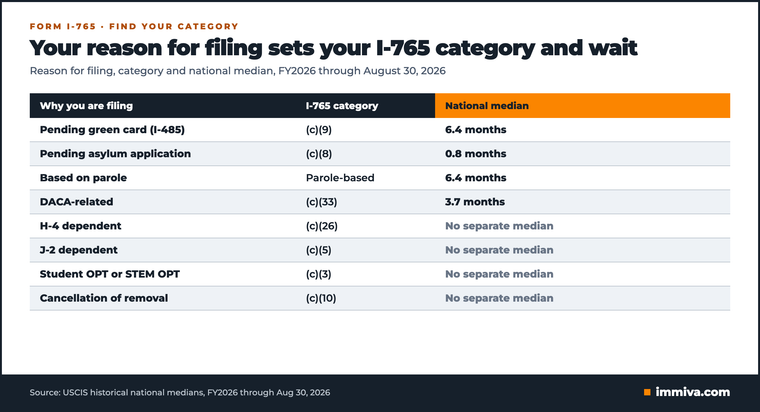
Start with the reason you filed; the form number alone is not enough. USCIS uses I-765 for several types of employment authorization, with different eligibility rules. Look at your prior card, application copy, and receipt notice, then check the category against the official instructions. (USCIS Form I-765)
National medians: a dated reference
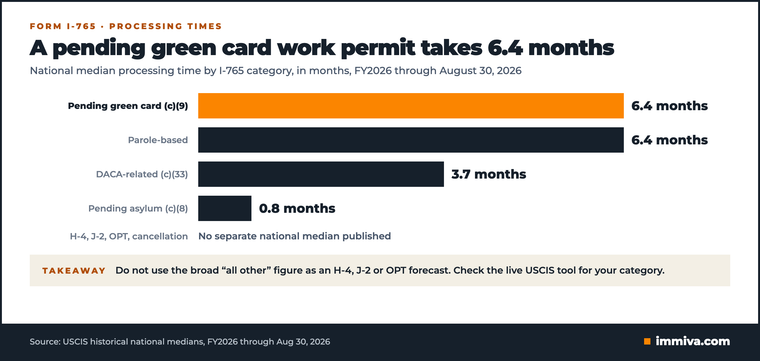
The first four rows come from USCIS’s historical table. The remaining rows cover categories without a separate median in that table. Do not use the broad “all other” figure as a specific H-4, J-2, or OPT forecast. (USCIS historical processing times)
Category or filing basis | FY2026 national median through August 30 | How to use it |
|---|---|---|
Pending I-485, generally (c)(9) | 6.4 months | Historical adjustment-based reference |
Pending asylum, generally (c)(8) | 0.8 months | Broad historical asylum row; not a separate renewal estimate |
Based on parole | 6.4 months | Historical parole-based reference |
DACA-related, (c)(33) | 3.7 months | Historical DACA-related reference |
H-4 spouse, (c)(26) | No separate median in this table | Select the matching category in the live tool; see the H-4 timing guide |
J-2 dependent, (c)(5) | No separate median in this table | Check the applicable live category; see the J-2 timing guide |
OPT or STEM OPT, (c)(3) | No separate median in this table | See the OPT timing guide |
Cancellation-related, (c)(10), and other categories | No separate median in this table | Follow the category options in the live tool |
Find the estimate that fits your case
Use the USCIS processing-time tool with your form, category, and applicable office. Keep initial filings separate from renewals wherever the tool offers that distinction. The USCIS guide to interpreting processing times explains the case details needed for a lookup.
Write down the date you checked, the exact category label, and the office selected. You can refer back to this record to see whether the estimate changed and confirm you are comparing the same type of application. For broader context across forms, use our USCIS processing times by form guide.
Why two websites can show different numbers
A median is the halfway point among completed cases. The live USCIS estimate generally reflects the time needed to finish 80% of cases adjudicated over the previous six months. Different reporting periods and categories also affect comparisons. Neither measure promises when a pending application will finish. (USCIS historical table; processing-time methodology)
A historical median and a later office estimate can differ even when both are accurate, because they measure different things. Before relying on a number, check its source, reporting period, category, and measure. Our explanation of USCIS averages explains how to read those numbers.
Green card applicants and asylum applicants use different clocks
Pending green card application: (c)(9)
An adjustment-based work permit is based on a pending I-485 application. USCIS’s filing guidance allows the I-765 to be submitted with the I-485 or afterward, with the required evidence. Check the I-765 timeline for the work permit. The green card timeline does not tell you when the work permit will be approved. (USCIS Form I-765)
Keep your notices organized by form. If you are tracking both benefits, our I-485 processing-time guide covers the green card wait, while the I-485 EAD and advance parole guide explains the related documents. When checking progress, make sure the receipt number belongs to the benefit you want to track.
Pending asylum application: (c)(8)
For an initial asylum-based EAD, USCIS currently says you must wait 150 days after filing the asylum application before applying, and employment authorization cannot be issued before 180 days. Applicant-caused delays can affect the asylum EAD clock. Those waiting periods are distinct from how long USCIS takes to decide a properly filed I-765. (USCIS Form I-765, “When to file”)
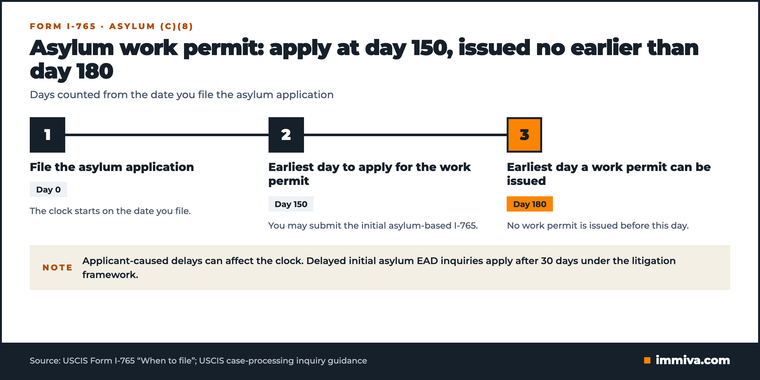
Special inquiry procedures also apply to delayed initial asylum EAD applications. USCIS’s e-request guidance addresses initial applications pending beyond 30 days under the applicable litigation framework. That does not create a general 30-day approval promise for renewals or other categories. (USCIS case-processing inquiry guidance)
If you are renewing a card, select the renewal option when available. Do not assume the initial asylum timeline or the broad historical asylum median tells you how long your renewal will take. Use the category and filing-type distinctions in the official processing-time tool.
What happens after biometrics?
There is no single I-765 processing time after biometrics that applies to everyone. USCIS describes biometrics as a way to verify identity and support background and security checks. Its appointment guidance does not promise an EAD decision a fixed number of days afterward. (USCIS biometrics guidance)
Completing your appointment today does not tell you whether approval is a week or several months away. Read your latest notice and follow any instructions you still need to complete. Our biometrics appointment guide explains what the appointment involves.
Keep track of three dates separately: your receipt date, any appointment or response deadline, and your current card’s expiration. Use the receipt date for your case lookup and the appointment or response deadline to plan when you must act. Review the card’s expiration with your employer when assessing continued work authorization. A notice about one of these dates does not settle the questions raised by the others.
If USCIS requests additional evidence, follow the deadline and delivery instructions on that notice. You can plan to meet the response deadline, even though you cannot control the overall queue. USCIS identifies responses to evidence requests, workload, and policy changes among the factors that can affect processing. (USCIS processing-time methodology)
Renewal timing: check whether your work authorization continues
A pending renewal does not automatically mean you can keep working. DHS ended the general automatic EAD extension for covered renewal applications filed on or after October 30, 2025, and finalized that change effective October 14, 2026. Previously granted qualifying extensions based on earlier filings were not removed by that rule. (DHS final rule)
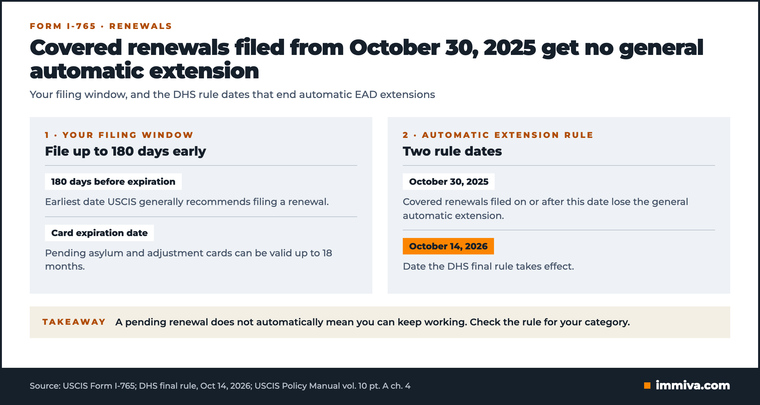
Other protections may still apply, including extensions provided by other law or applicable TPS notices. Check the rule for your category and documents to determine whether you have a basis to keep working after the card expires. An expired card or a renewal receipt alone does not settle that question. (DHS final rule)
USCIS generally recommends filing a renewal up to 180 days before expiration, subject to category-specific rules. Filing early gives you more of the available window, though it does not guarantee a decision before the card expires. Our EAD renewal timing guide explains when to start preparing. (USCIS Form I-765)
Also check how long your card is valid. USCIS currently lists maximum 18-month validity periods for categories including pending asylum and adjustment of status. Read the dates on your card and check the applicable category. Validity periods can differ between renewals. (USCIS Policy Manual, volume 10, part A, chapter 4)
If you have been putting off the renewal paperwork, Immiva’s I-765 preparation service turns your answers into form entries and provides a document list, fee guidance, and mailing instructions for supported categories. You can review the preparation checks on its live product page before paying.
Check status and find your case-inquiry date
Start with your receipt notice and the latest USCIS correspondence. For a status check, use the receipt number for your I-765. Our EAD status guide explains how to track your application. For a processing-time inquiry, USCIS’s tool needs the relevant case details and your receipt date. (USCIS processing-time guidance)
Your case-inquiry date is not your estimated approval date. USCIS calculates the date when you can submit an inquiry separately from its main processing estimate. Enter your receipt date into the tool and follow the result it provides; do not simply add the displayed month count to your filing date. (USCIS processing-time methodology)
Keep a short record for any inquiry:
- Your I-765 receipt number and received date.
- Your category and whether this is an initial application or renewal.
- The office and category selected in the tool.
- Any recent notices, evidence requests, or responses.
- The inquiry confirmation and response, once submitted.
USCIS’s e-request page also has specific instructions for certain case types. For example, it directs DACA renewal applicants to contact USCIS about cases pending longer than 105 days. Read the applicable instructions before using a general inquiry route. (USCIS case-processing inquiry guidance)
After approval, keep checking your case record for card-production and mailing updates. You still need to wait for the physical card to arrive; historical adjudication statistics do not tell you when it will be delivered. USCIS’s premium-processing guidance likewise distinguishes its adjudicative action from receiving the EAD.
Expedite options and filing checks
Can you pay for a faster I-765 decision?
USCIS currently offers I-765 premium processing for the OPT categories (c)(3)(A), (c)(3)(B), and (c)(3)(C). The published timeframe is 30 business days for adjudicative action, which can include an evidence request rather than approval. That service is not listed for adjustment-based, H-4, or J-2 EADs. (USCIS premium-processing guidance)
Students can read our OPT premium-processing guide to help decide whether to request that service. Other categories must meet the expedite criteria; paying an extra fee does not remove that requirement.
What supports an expedite request?
USCIS considers requests individually. Its criteria include severe financial loss, urgent humanitarian circumstances, certain nonprofit or government interests, and clear USCIS error. A need to obtain work authorization alone is generally insufficient without other compelling circumstances. Job loss can matter depending on the facts. (USCIS expedite requests)
Support your request with evidence of the specific harm: an employer’s explanation, a dated termination warning, or documents showing essential expenses and the effect of lost income. Explain why the case is urgent and how the evidence supports the relevant criterion. Approval remains discretionary. See the H-4 expedite guide for category-specific context. (USCIS expedite requests)
Avoid a preventable filing problem
Check the current form edition before sending a new application. As verified on October 24, USCIS lists 08/21/25 for I-765 and says it is not accepting 09/15/26 under the September 14, 2026 court order. Check the live form page, since a saved checklist may be out of date. (USCIS Form I-765)
For a supported category, Immiva’s work permit preparation can help organize the form, supporting documents, and filing instructions. Review every answer before signing. Preparation can help you address packet errors. USCIS controls how long adjudication takes.
Frequently Asked Questions
It depends on the filing basis. The historical table above gives dated context; use USCIS’s live tool for your category and office. Our processing-times guide explains the broader comparison. (USCIS tool)
The timelines can differ. Select the correct filing type where USCIS offers it. Our renewal timing guide covers when to prepare. (USCIS Form I-765)
That depends on your existing authorization and any applicable extension. A renewal receipt alone does not establish continued work authorization for every category. See the H-4 renewal guide if that is your category. (DHS final rule)
USCIS’s appointment guidance does not give a fixed approval deadline after biometrics. Our biometrics guide explains that step. (USCIS biometrics guidance)
USCIS’s current I-765 premium-processing list includes the three OPT categories, not (c)(9). (USCIS premium-processing guidance)
Plan around your category and your next deadline
Start with your receipt notice and current card. Identify your category and check the live estimate, using the work permit processing time to plan without treating it as a promised start date. Record your next action deadline. If you are renewing, check whether your work authorization continues separately from checking your application’s status.